Having trouble downloading your backgrounds?
Click here if you've downloaded the files but cannot find them?
Against Company Policy
Our files are normally downloaded as something called an EXE file. Inside the EXE file are all the individual backgrounds compressed into one smaller file. When you run the EXE file your computer will extract and uncompress all the backgrounds. Larger companies quite often will place an automatic block, to stop their employees from downloading an EXE file.
This is an example message from a large corporation.
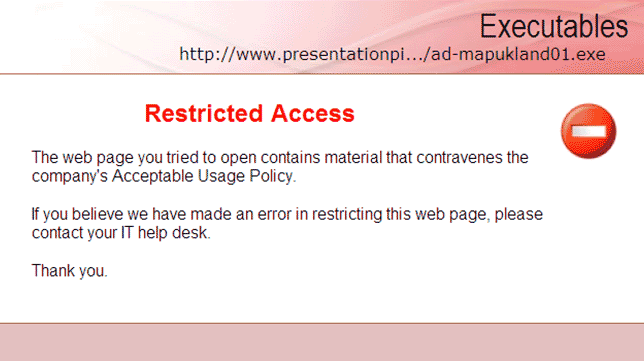
If you feel your company is blocking you from downloading your purchase, please email us, and we will email you the files as regular powerpoint files. Most companies will allow you to receive powerpoint files as an attachment.
An incomplete download is the most common problem
When a file is downloading, your computer should display a progress report.
This is normally a blue or green bar that gets longer as the file is downloaded.
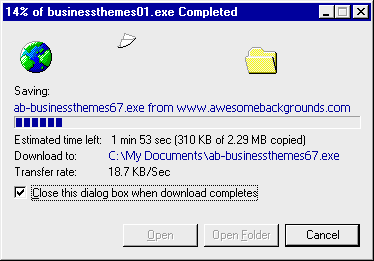
In this example, above, the file called ab-businessthemes67.exe from our website has been downloading for 1 minute and 53 seconds.
It has downloaded 310KB so far. The filesize in total is 2.29MB (2290KB). The file is being saved in the directory called C:\My Documents\
Occasionally, due to various reasons, such as a poor phone line connection, clicking cancel by mistake, general internet traffic, the download may not complete 100%.
If the download does not complete 100% then you may be left with a file that is not all there.
When you view the directory (using my computer or windows explorer, you may have to click the "view" menu, then choose "details" to show the filesize) that you downloaded the file to,
your computer may show the filesize as being a number smaller than it should be. For example ab-businessthemes67.exe 1,850KB. In this case part of the file is missing. As it should display 2,290KB. Some computers will display a slightly different number such as 2,355KB
So what should you do?
- Simply re-download the file again from the link originally provided
http://www.awesomebackgrounds.com/cgiscripts/uniquecode123/SetName4Code.htm
- This sometimes does not work for some computers. As when you re-download the file, your computer thinks it already has the file, so does not re-download it.
In this case many people find that if they delete the incomplete file, before re-downloading the file, it works everytime.
- Sometimes certain browsers may rename the file e.g from ab-businessthemes67.exe to ab-businessthemes.zip
In this case right click the file and make sure the 3 letter extension is .exe
[filename] is not a valid Win32 application
This can be caused by various reasons.
- Sometimes it's caused by an incomplete download.
Windows tries to execute (run) the file,
but because part of the file is missing it gives the error. Solution - re-download the file.
- Sometimes it's caused by your computer renaming the file. The file should always end in .exe not .zip.
You can right click a file after it has downloaded and choose "rename" to rename it from .xyz to .exe
Then you may be able to double click the file to extract the backgrounds as normal
- Some people find that if they have WinZip or similar installed, they can start WinZip,
then click the "File" menu, choose "open archive", then "extract" the files manually.
- Some large corporations "lock down" their computers for security and safety reasons. One of the lock down procedures
is to block any downloads (or running) of .exe (executable) files. If you think this may be the case, please contact us, and we will email you new links
to download the files as individual .pot (powerpoint) files.
- Some users have kindly reported to us, that when they download the files direct to their desktop, this causes the Win32 Error (invalid application),
We've tested this ourselves and only managed to get the Win32 error once, so we cannot say that downloading direct to your desktop will always cause this problem.
But if you do get the win32 error, then something else to try, is to download to a new folder (or anything but your desktop) on your computer.
Please remember - we are here to help
We're not here 24/7, but we can help you buy emailing your backgrounds to your inbox ASAP.
|


